 Inserting a Key Legend for Genogram Symbols Inserting a Key Legend for Genogram Symbols
GenoPro has a tool to quickly create a legend of your family tree /
genogram. In the main
window of GenoPro,
press the keyboard key Y and GenoPro will generate a legend based on
the symbols you used in your document. Use the
mouse to position where you wish to insert the legend in your document.
For instance, inserting a legend on the following genogram would give this
result:
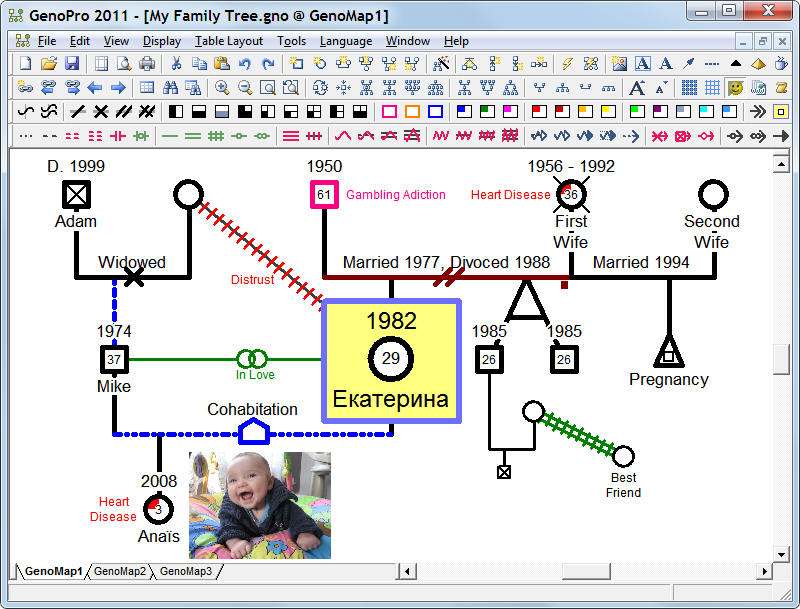

After inserting your legend, you still have to write the text according to
your color symbols. GenoPro will count the number of instances of each
symbol and will suggest some text (such as a disease or addiction) based on
the color, however you are free to replace the text with anything you want.
You may also insert pre-defined legends. Simply right-click on the
main window and you will see the following menu.
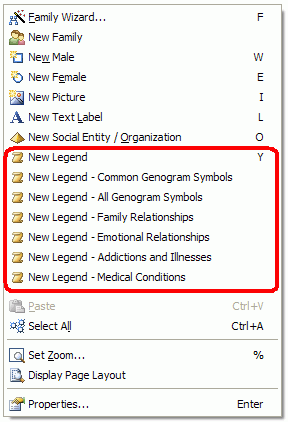
Then, you delete the symbols you do not wish to use.
Finally, you may also create your legend manually. You copy & paste
the symbols you want in your legend, and then mark them as "Label".
The "Label" will exclude those symbols from future legends as well as from
any HTML report generated by the report
generator.
Learn more about genogram symbols.
|