Symbols used in Genogram
A genogram is a graphic representation of a family tree that displays the
interaction of generations within a family. It goes beyond a traditional family
tree by allowing the user to analyze family, emotional and social relationships
within a group. It is used to identify repetitive patterns of behavior and to
recognize hereditary tendencies. Here are some of the basic components of a
genogram.
Genogram Symbols
In a genogram, males are represented by a square and females by a circle. If
you are unsure of the how to place individuals in complex family situations,
such as reconstituted families, please visit the
rules to build a genogram. GenoPro also has two
other gender symbols, the diamond for a pet and the question mark for
unknown gender.
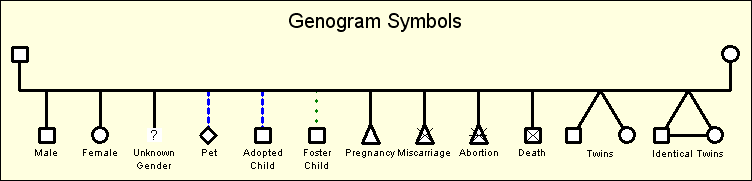
Standard Gender Symbols for a Genogram
In a standard genogram, there are three different types of children:
biological/natural child, adopted child and foster child. A triangle is used to
represent a pregnancy, a miscarriage or an abortion. In the case of a
miscarriage, there is a diagonal cross drawn on top of the triangle to indicate
death. Abortions have a similar display to miscarriages, only they have an
additional horizontal line. A still birth is displayed by the gender symbol;
the diagonal cross remains the same size, but the gender symbol is twice as
small.
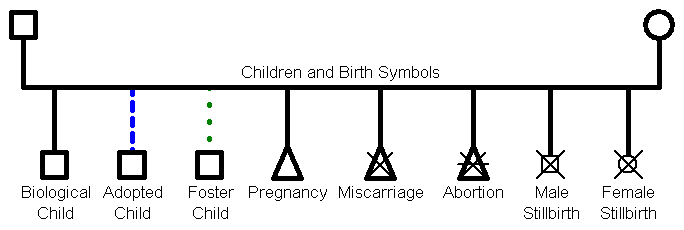
Genogram Symbols for Children's Links and Pregnancy Terminations
In the case of multiple births such as twins, triplets,
quadruplets, quintuplets, sextuplets, septuplets, octuplets, or more, the child
links are joined together. GenoPro uses the term twin
to describe any type of multiple birth. With GenoPro, creating twins is as
simple as a single click on the toolbar button "New Twins". GenoPro take cares
of all the drawing, including joining the lines together. Identical twins (or
triplets ...) are displayed by an horizontal line between the siblings. In the
example below, the mother gave birth to fraternal twin brothers, identical twin
sisters and triplets, one of whom died at birth.
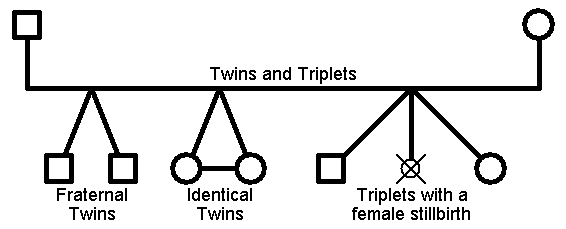
Child links are joined for multiple births such as twins and triplets
In addition to this, GenoPro supports
medical genograms by using color codes and
special drawing in the gender symbol. To learn more, please visit
medical genograms.
Printable Genogram Symbol list
We have created a printable Acrobat PDF file that includes the list of Genogram symbols that you can download
and print if you wish to have a quick reference. You can download the file by clicking on the thumb at the left or
here.
Genogram Legend
At any time you can add a genogram legend by right-clicking on your
mouse and selecting a new legend. The legend symbols have already been
marked to be excluded from the report, so they will not appear when you
generate a report.
Previous: Genogram examples
Next: Genogram Rules