
|
Social Relationship properties
There are many types of social
relationships; every link have their own property such as color and
style, as well as a text field for comments
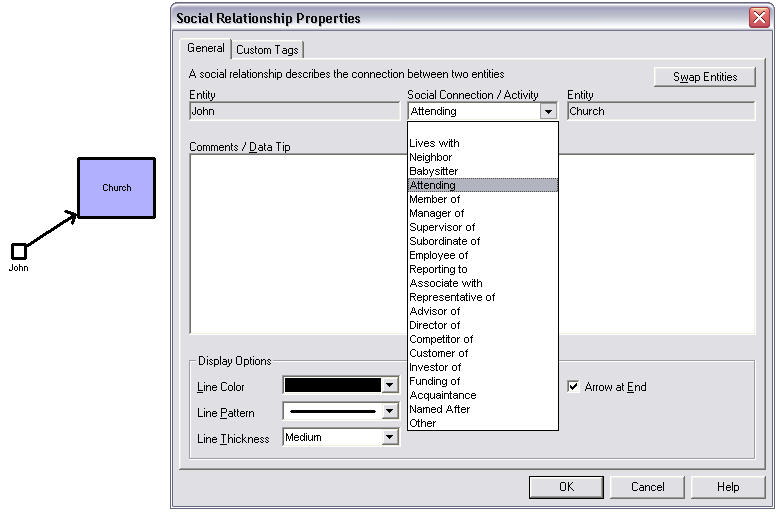
Social relationship sample and
properties windows
A social relationship is usually a relationship between an individual and an
entity, but in some cases it can be between two individuals. For example,
John is Subordinate of Lauren.
To create a social relationship, must first create the individuals  /
/  or entities
  involved.
Then, select the first entity, and click on the new social relationship
button. involved.
Then, select the first entity, and click on the new social relationship
button.  .
GenoPro will automatically ask you to select the second entity in the
relation. .
GenoPro will automatically ask you to select the second entity in the
relation.
| | | | If you need to invert the relation between an individual and a social entity, you do not have to start over. Simply use the [Swap Entities] button in the social relationship properties window. | | | | |
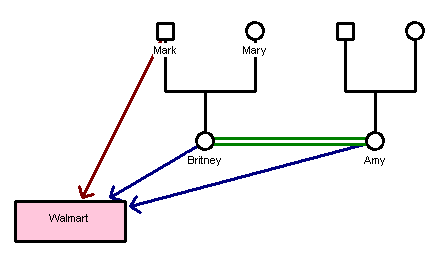
A social relationship sample
The example illustrates a social relationship with the social entity Walmart.
Mark is a manager of the store while Britney and her
close friend
Amy work at the same store.
Genograms are not limited to families. GenoPro can be used to indicate social
relationships within a group. The user can create trees for businesses,
churches, neighborhoods, etc. These will include people who are not related,
but who are involved in each others lives through other types of
relationships.
Users can also create social links to social entities or organizations, such
as schools attended, memberships to clubs and associations.
The social genogram can then establish where people know each other from.
Pre-defined values
Here are some types of social relationships that are currently available on
GenoPro.
|
Lives with |
A relationship where one person lives in another persons home without
being involved in a union or without being part of immediate family. Use
one of the family relationships in the case of cohabitation. |
|
Neighbor |
A person who lives within a close distance of the others residence. |
|
Babysitter |
A person who keeps watch of the children on occasion. |
|
Attending |
Use with a social entity or an organization. For example, John is attending
the University of Ottawa. |
|
Member of |
Also use with a social entity or organization. For example, Mary is a
member of the local Rotary Club. |
|
Manager of |
Use with social entities. Mostly useful in a corporate hierarchy to
identify who is involved in management. |
|
Supervisor of |
A person involved in administrative duties in a business, government, a
school or an operation. |
|
Subordinate of |
A person placed in a lower rank or position. |
|
Employee of |
Use to link an individual to his or her place of work. |
|
Reporting to |
Use to identify a person in a direct line of communication within a corporate
hierarchy. |
|
Associate with |
Use to identify business partners. |
|
Representative of |
Use to identify representatives of a social entity or organization.
|
|
Advisor of |
A person who provides counsel to another. |
|
Director of |
Use to identify one of a group of persons entrusted with the overall
direction of a corporate enterprise. |
|
Competitor of |
Businesses involved in the sale of similar goods or services within the
same market. |
|
Customer of |
A person who purchases a commodity or a service from a provider. |
|
Investor of |
Use to identify a person or organization who commits money to a social
entity or organization to earn a financial return. |
|
Funding of |
Use to identify providers of funds to a project or an organization. |
|
Acquaintance |
Two individuals who know each other by face or by name, who have previously
communicated by phone or email, or have previously met. |
|
Other |
User-defined category. |
Read More:
|